https://dba.stackexchange.com/questions/8239/how-to-easily-convert-utf8-tables-to-utf8mb4-in-mysql-5-5
- Jan 28 Sun 2018 14:23
-
Mysql utf8 to utf8mb4
https://mathiasbynens.be/notes/mysql-utf8mb4
https://dba.stackexchange.com/questions/8239/how-to-easily-convert-utf8-tables-to-utf8mb4-in-mysql-5-5
- Sep 18 Mon 2017 16:32
-
curl upload file
#curl -v -F 'file=@/tmp/444.jpg' -b cookies.txt -c cookies.txt https://your.web.site/upload
其中,file要看該網頁的變數名稱決定
其中,file要看該網頁的變數名稱決定
- May 27 Sat 2017 10:44
-
fisa vim on rasbian
- May 21 Sun 2017 20:33
-
Amazon cloud drive
amazon 認證 token有時效期現
https://acd-cli.readthedocs.io/en/latest/authorization.html
上面acd_cli 提供產生oauth_data的網址失效了
害我很久無法使用acd_cli
後來去drivesink
https://drivesink.appspot.com/
在最下面有一個"access configuration"
點進去後
輸入帳號密碼
會產生新的token
把內容貼到oauth_data
就算更新認證的token了
https://acd-cli.readthedocs.io/en/latest/authorization.html
上面acd_cli 提供產生oauth_data的網址失效了
害我很久無法使用acd_cli
後來去drivesink
https://drivesink.appspot.com/
在最下面有一個"access configuration"
點進去後
輸入帳號密碼
會產生新的token
把內容貼到oauth_data
就算更新認證的token了
- May 10 Wed 2017 20:56
-
tcpdump 觀察 http header
- Apr 29 Sat 2017 20:37
-
telegram python api
- Mar 08 Wed 2017 17:28
-
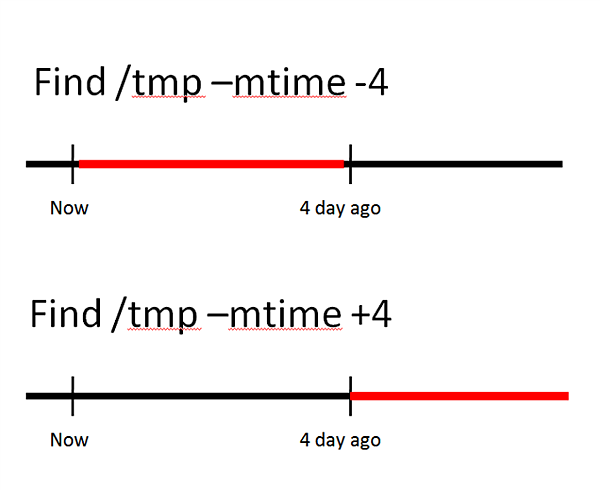
find before after some time
- Mar 07 Tue 2017 17:28
-
vim diff mode color
- Mar 06 Mon 2017 14:08
-
diff 檔案內容比對
- Feb 14 Tue 2017 22:12
-
HC-05 vs HC-06
http://www.martyncurrey.com/hc-05-and-hc-06-zs-040-bluetooth-modules-first-look/
- Jan 28 Sat 2017 10:28
-
Python Web开发的进击之路
http://www.jianshu.com/p/b7681abee5cb
- Jan 24 Tue 2017 17:06
-
bash prompt git branch name
用git branch 去取得目前的branch name
不要用git checkout (太花時間了)
#vi ~/.bashrc
--------------------------------
:
:
git_branch()
{
cd /your/git/dir
git branch 2> /dev/null | sed -e '/^[^*]/d' -e 's/* \(.*\)/(\1)/'
}
export PS1='\[\e[1;32m\]\u@\[\e[1;31m\]\t:\[\e[1;33m\]\w\[\e[1;36m\] $(git_branch)\[\e[0m\]\$ '
-------------------------------
#source ~/.bashrc
不要用git checkout (太花時間了)
#vi ~/.bashrc
--------------------------------
:
:
git_branch()
{
cd /your/git/dir
git branch 2> /dev/null | sed -e '/^[^*]/d' -e 's/* \(.*\)/(\1)/'
}
export PS1='\[\e[1;32m\]\u@\[\e[1;31m\]\t:\[\e[1;33m\]\w\[\e[1;36m\] $(git_branch)\[\e[0m\]\$ '
-------------------------------
#source ~/.bashrc
